Home › Trint alternative
Comparison · Interview transcription
A Trint alternative that never uploads the interview
Trint is a cloud transcription platform built for newsrooms: you upload the recording, it is transcribed on Trint's servers, and your team edits it together in the browser on a per-seat subscription. Lesskeys makes a narrower bargain — it records and transcribes on your own Mac, works with the Wi-Fi off, and you buy it once. No account, no upload, no seats.
Why people look for a Trint alternative
Trint is a well-built product with a clear heritage: it was founded by a working foreign correspondent, and it shows. The verbatim editor that binds every word to the audio behind it is genuinely excellent, the collaboration model suits a newsroom, and the translation workflow is real. People rarely leave it because it is bad. They leave for one of three structural reasons.
The upload. Trint is a cloud platform: the recording goes to its servers to be transcribed. That is fine for a press conference and impossible for a confidential source. The subscription. It is billed per seat, per month, which is awkward for one freelancer with occasional interviews. And the browser. The work happens in a web app, so the transcript lives in an account rather than on the machine that recorded it.
One clarification, because Trint's mobile app does advertise working offline and the two meanings are easy to conflate. That feature is offline resilience: if you lose signal mid-recording the app keeps capturing, then uploads and catches up once you are back online. The audio still goes to Trint's servers to be transcribed — the recording survives the outage, it just waits for a connection. Offline processing, where the transcription itself happens on your own hardware and nothing is ever sent, is a different thing, and it is the thing this page is about.
Lesskeys does not compete with Trint on collaboration — it has none. It makes a narrower trade: the recording and the transcript never leave your Mac, there is no account, and you buy it once.
How Lesskeys is different
| Lesskeys | Trint | |
|---|---|---|
| Where audio is processed | Your Mac, always | Uploaded to their cloud |
| Works with no internet | Yes | No — browser-based |
| Account required | No | Yes |
| Pricing model | One-time purchase | Subscription, per seat |
| Automatic speaker labels | Yes, on-device | Yes |
| Transcript-synced playback | Yes | Yes |
| Records the call itself | Yes — mic + system audio | Upload your own file |
| System-wide dictation into any app | Yes | No |
| Collaborative editing & sharing | No | Yes |
| Translation workflow | No | Yes |
| Platforms | Mac only (macOS 13+, Apple Silicon) | Web, plus mobile |
What Lesskeys does not do
Worth being blunt about, because a large part of Trint's value is in things Lesskeys deliberately has no answer for:
- No collaboration. No shared workspace, no seats, no comments, no handing a transcript to an editor inside the tool. The files are on your Mac; sharing them is your job.
- No web app and no mobile app. The transcript lives on the machine that made it. There is no account to log into from somewhere else, which is the point and also the limitation.
- No translation workflow. Lesskeys transcribes speech in the language it was spoken — 99 of them, auto-detected — but it does not translate a finished transcript into another language for publication.
- No summaries or story tooling. You get a verbatim, speaker-attributed transcript. What you build from it is up to you.
- Not cross-platform. Mac only, and Apple Silicon only, because the whole design depends on running the model on the Mac's own GPU.
If a shared newsroom workflow is load-bearing for you, keep Trint. This page is not trying to talk you out of it.
Where the two overlap: an accurate, speaker-labeled record
This is the part Lesskeys is built for, and it does it without an upload. Drop in a file you already have — MP4, MOV, WAV, M4A — and it is transcribed on your own machine. Or record the conversation directly: Lesskeys captures your microphone and the Mac's system audio together, so an interview over Zoom, Meet, Teams or a browser tab is recorded from your side with nothing joining the call.
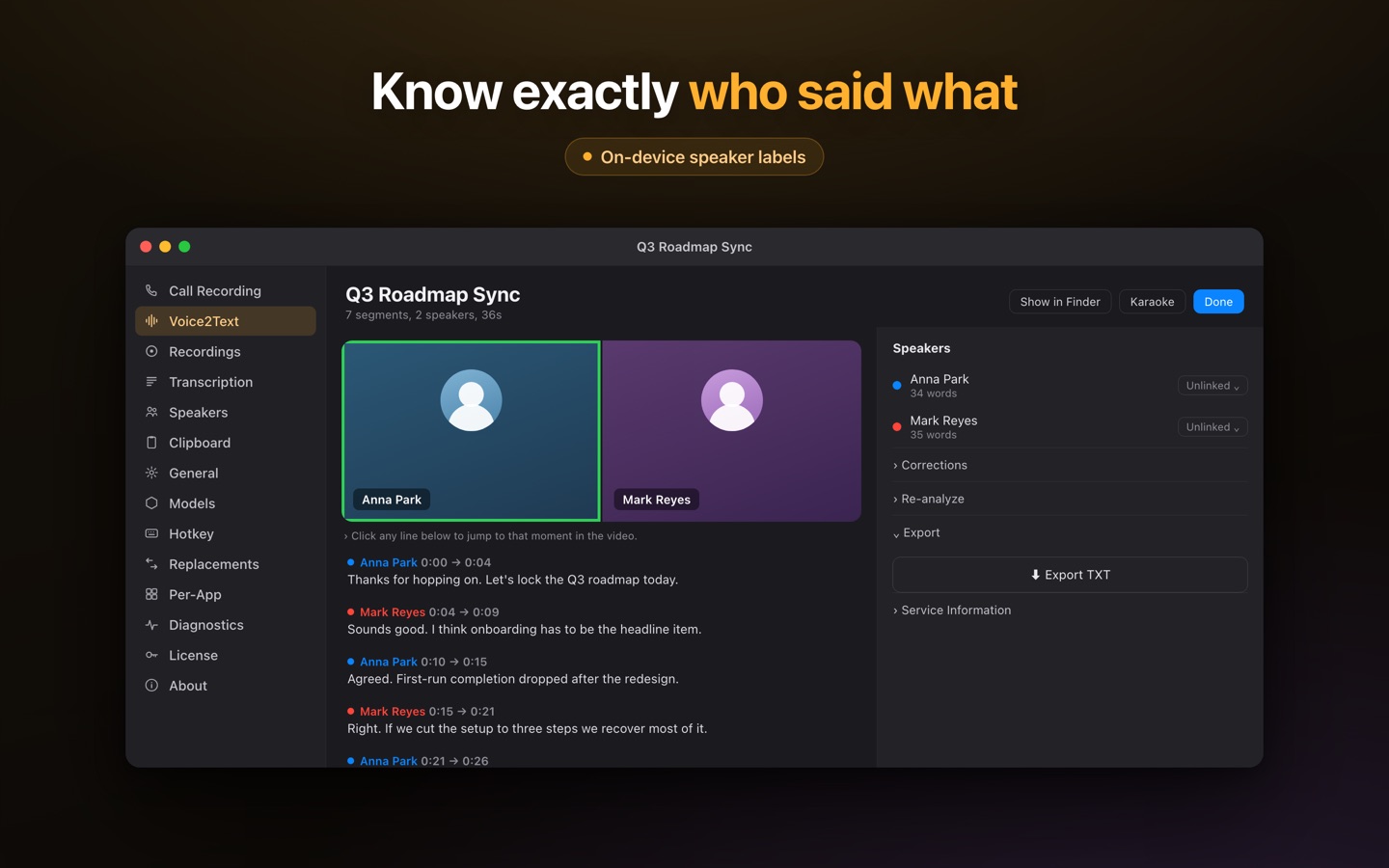
Speaker diarization runs locally too, so the transcript comes back labeled by who spoke. Name a recurring voice once and the label sticks in later recordings — useful if you interview the same people repeatedly. Every recording lands in a library you can search by phrase, speaker or date, and clicking any line jumps the player to that exact moment, which is the Trint habit most people miss when they leave.
Because it is a menu-bar app, the same install also gives you system-wide dictation: press ⌥Space in any app, speak, and the transcribed text is copied to your clipboard ready to paste with ⌘V. All of it offline.
For journalists specifically
The case is simple and it is about sources, not features. A confidentiality promise to a source is not conditional on a vendor's security being good; it is a promise that the recording does not go anywhere. Once a file is uploaded it exists on someone else's infrastructure, subject to someone else's breach surface, retention policy and legal jurisdiction. Transcribing without uploading removes that question rather than answering it — there is no server-side copy to subpoena, leak or retain, because there is no server.
The practical version: on a plane, in a courthouse basement, or in a country where you would rather your traffic were unremarkable, it still works, because nothing needs to reach the internet. See Lesskeys for journalists for the longer version.
A workflow with no upload and no seat
- Record or drop in a file — mic plus system audio for a live call, or an existing recording.
- Transcribe locally — the model runs on your Mac's GPU. Nothing is uploaded, and there are no minutes to count.
- Name the speakers once — voiceprints persist, so the same people are labeled automatically next time.
- Search it later — every recording is findable by phrase, speaker or date, on your Mac.
Where Trint is the better tool
Trint is built for teams that produce work from recordings together, and for that it is the stronger product. Several people can work the same transcript, an editor can pick up where a reporter left off, the translation workflow is there when a story needs to run in more than one language, and it runs anywhere there is a browser — a Windows laptop, a borrowed machine, a phone. Its editor is mature and its newsroom pedigree is not marketing.
The trade being offered here is narrow and specific: give up collaboration, the web app and translation, and in exchange the audio never leaves your Mac, there is no per-seat monthly bill, no account, and it works with the Wi-Fi off — plus system-wide dictation across macOS from the same one-time $49.99 unlock. For confidential interviews, protected sources and a personal archive you actually own, that is the better trade. For a newsroom of eight people editing one transcript, it is not.
Trint is a trademark of its respective owner. Lesskeys is an independent product and is not affiliated with, endorsed by, or sponsored by them. Feature sets, plans and pricing change — verify current details on each vendor's site before deciding. Trint details above reflect its public website as of 31 August 2026.
Free to download. One-time unlock. No subscription. · Pro $49.99 one-time · macOS 13+
FAQ
Is there a Trint alternative that doesn't upload my audio?
Yes. Lesskeys transcribes entirely on your Mac — the audio file and the finished transcript never leave the machine, and it works with no internet connection at all. Trint is a cloud platform, so recordings are uploaded to its servers to be processed.
Is Lesskeys a subscription like Trint?
No. Lesskeys is free to download and unlocks permanently with one $49.99 in-app purchase. There is no per-seat monthly fee and no monthly transcription-minute allowance, because the transcription runs on your own hardware.
Does Lesskeys label who is speaking?
Yes, and it runs on-device like everything else. Speaker diarization separates the voices in a recording and labels the transcript by speaker. Name a recurring voice once and Lesskeys recognises it in later recordings automatically.
Can it transcribe interview files I already have?
Yes. Drop in common formats such as MP4, MOV, WAV or M4A and the audio is extracted and transcribed locally, with speaker labels and a transcript-synced player that jumps to any line you click.
Does Lesskeys do collaborative editing or translation like Trint?
No. There is no shared workspace, no seats and no translation workflow — it is a single-user Mac app and the files stay on your Mac. If a team needs to edit one transcript together, Trint is the better tool and this page says so.
Why would a journalist choose the offline option?
Because a promise to a source is not conditional on a vendor's security. Once a recording is uploaded it lives on someone else's infrastructure, under their retention policy and legal jurisdiction. Transcribing locally removes that exposure instead of managing it.