Speech to text for Mac & MacBook · 100% on-device
Speech to text on your Mac that never leaves your Mac
Lesskeys is voice to text and dictation in one app, for Mac and MacBook. Press ⌥. to dictate into any app you are already in, or drop in a recording to transcribe calls, interviews and video with automatic speaker labels — all on your Mac, fully offline.
Download on the Mac App StorePay once. No subscription. · macOS 13+
Press ⌥ . anywhere and just talk.
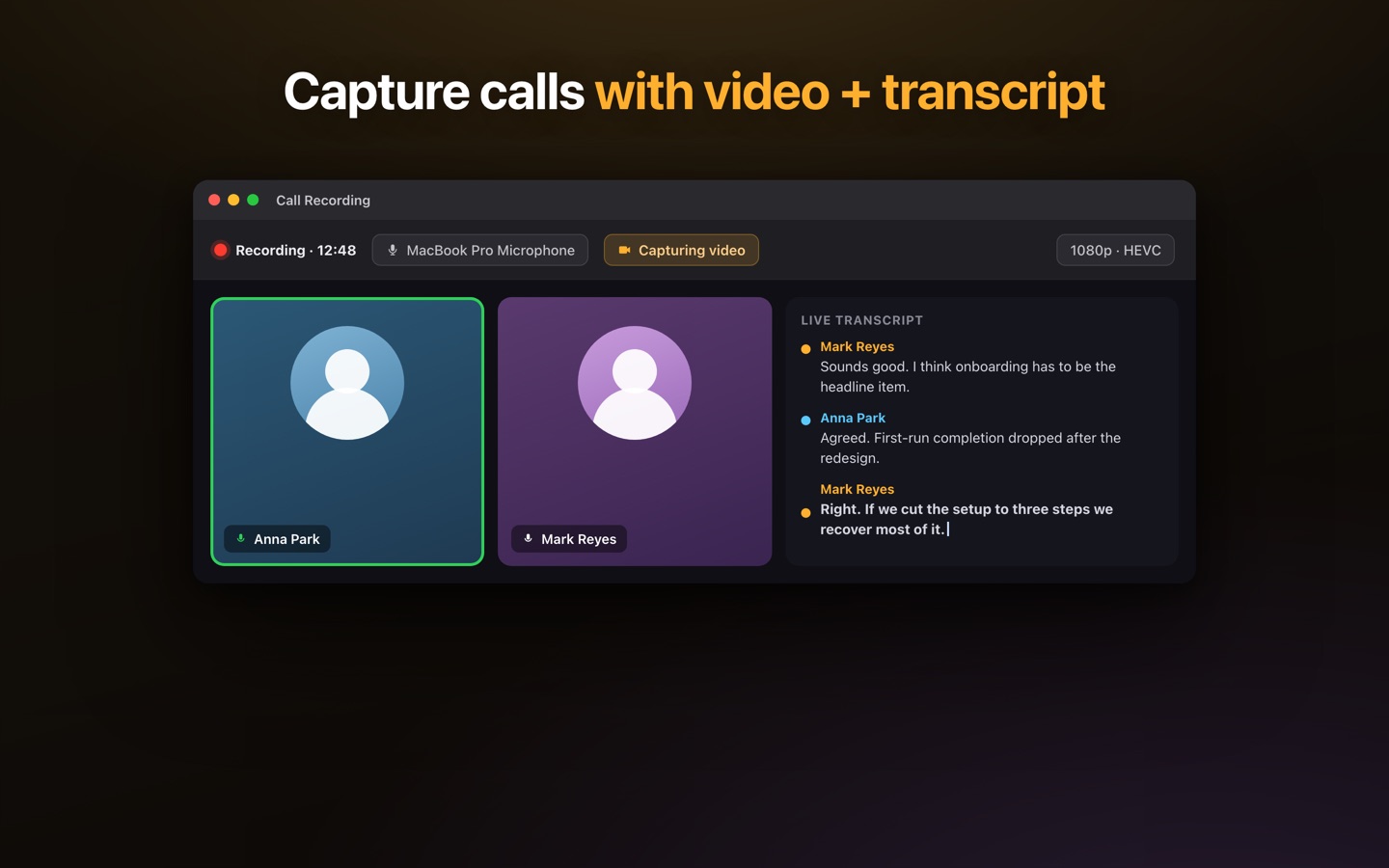
What does it look like in use?
Thirty seconds: record a call, get a transcript that shows who said what, search everything you have ever recorded, and dictate anywhere — all on your Mac.
What can you do with voice to text on a Mac?
Six things people check before they download it. None of the answers involve uploading your audio anywhere.
Does it work without the internet?
Yes. Transcription runs on your Mac's own GPU, in 99 languages it detects for you. Nothing is uploaded, there is no account to make, and it works with Wi-Fi switched off.
Dictation in any app on your Mac
Press ⌥. in Mail, Slack, Xcode or a browser and talk. Your words are transcribed on the Mac and copied to the clipboard, so one ⌘V puts them where the cursor already was.
Voice to text in Google Docs, Word and Gmail
It works in the browser too: a Google Doc or a Gmail reply takes dictation exactly the way Word or any other native app does. No browser extension, no add-on to install.
Transcribe a recording you already have
Drop in an audio or video file — a recorded call, an interview, a lecture, a screen recording — and read it back as text, with playback synced to the transcript.
Who said what, with no bot in the meeting
Record a Zoom, Teams or Meet call from your own Mac, system audio and mic together, and get a transcript with speaker labels computed on the machine. Tell the room you are recording.
What does it cost?
Free to download: 5 minutes of dictation a day, plus five audio and five video transcriptions in total. Recording itself is never metered. One $49.99 in-app purchase removes those limits, and you pay it once, not monthly.
What is Lesskeys, and does my Mac already do this?
Lesskeys is a menu-bar app for macOS doing two jobs that are normally two separate apps. Press ⌥. anywhere and speak: the transcription runs on your own Mac and the text lands on your clipboard, so one ⌘V drops it where the cursor already was — Mail, a Google Docs tab, Slack, a terminal. Hand it a recording instead and you get a transcript back: an audio file, a video file, or a call recorded from your Mac’s own audio while Zoom, Teams or Meet runs, with speaker labels worked out on the machine. Nothing joins the meeting to do it.
A small speech model ships inside the app, so the first thing you dictate needs no download at all. Larger models, and the separate models that work out who is speaking, are fetched once when you ask for them. After that the transcription itself makes no network call and there is no account — it works offline. If other people are on a recording, tell them; the rules differ by country and by employer.
Where the dictation already on your Mac lives
It is in System Settings → Keyboard → Dictation: switch it on, pick a shortcut — the microphone key, or Control pressed twice — and you can talk into any text field for nothing. Where it stops is a section of its own, further down this page.
Why is dictation not working on your Mac?
Three things explain most of it, and all three are free to check. The Dictation shortcut in that same pane is set to Off, so pressing it does nothing. The language you are speaking was never added to the Language list beside it. Or the Mac is listening to an input you had forgotten about — an idle Bluetooth headset, usually — which you can see under System Settings → Sound → Input. That one catches any dictation app, ours included.
How much does dictation software cost?
Dictation apps are usually sold by subscription, and transcription services usually charge by the minute of audio. This is neither: one in-app purchase of $49.99 lifts the free version’s limits for good — once, not monthly. The limits themselves are listed above. More on the dictation half: voice to text on a Mac.
How do you use speech to text on a Mac?
Press the hotkey
Hit ⌥. anywhere in macOS and start talking.
It transcribes locally
Your Mac's GPU turns speech into text on-device, in real time.
Paste it anywhere
Your words are copied to the clipboard — one ⌘V and they're in your document.
How is this different from the dictation built into macOS?
Every Mac already has dictation. Press the mic key, talk, and it types — it costs nothing, it is on your MacBook Air or MacBook Pro right now, and for a short message it is genuinely all you need. Lesskeys is for the four things it does not do.
- Recordings and files, not only live speech. Built-in dictation types what you are saying at this moment. Lesskeys also transcribes calls, meetings, interviews, audio files and video you already have.
- Who said what. Speaker labels are worked out on your own Mac, so an hour-long interview comes back as a readable transcript instead of one unbroken block of text.
- You pick the model. Choose the Whisper model that suits your Mac and your language — 99 languages, downloaded once and run locally, with no time limit on how long you speak.
- One shortcut, every app. ⌥ . behaves the same in Mail, Word, Slack, Xcode or a browser, and the text lands on your clipboard ready to paste.
If all you want is to dictate a short reply, the dictation already on your Mac is free and fine, and we would rather say so. Dictating into Word, transcribing a recorded call, or labelling speakers in an interview is where this one earns its keep — and you can compare it against sixteen other Mac tools before deciding anything.
Find what you came for
Three ways in, depending on what you already have.
Why does offline matter?
Most "private" transcription apps still send your audio to the cloud for the smart parts. Lesskeys doesn't — dictation, transcription, and speaker labeling all happen on your machine. That makes it a fit for anyone handling confidential recordings: journalists protecting sources, lawyers and researchers with sensitive interviews, or anyone who simply doesn't want their voice on someone else's servers. Your recordings stay on your device.
Read this in your language
Lesskeys works in 99 languages, and this site is written in 28 of them.
Frequently asked questions
Is Lesskeys really 100% offline?
Yes. All speech-to-text runs on your Mac using Apple Silicon's GPU. Nothing is uploaded, no account is required, and it works fully offline — even in airplane mode.
Does Lesskeys require a subscription?
No. Lesskeys is free to download, and one in-app purchase of $49.99 unlocks it permanently. You pay once and it's yours.
How do I use speech to text on a Mac?
Install Lesskeys, then press ⌥. anywhere in macOS and start talking. Your words are transcribed on your Mac and copied to the clipboard, so one ⌘V puts them wherever you already are — no window to switch to and no menu to open. You can change the shortcut to whatever you prefer.
Is this better than the dictation already on my Mac?
For a short message, honestly no — the dictation built into macOS is free and already on your Mac. Lesskeys is for what it does not do: transcribing recorded calls, meetings, interviews and video, labelling who said what, and letting you choose which of 99 languages and which Whisper model runs on your machine. See the full difference.
Can Lesskeys label who said what in a recording?
Yes. Lesskeys automatically labels speakers in calls and interviews using on-device speaker diarization — no cloud service involved.
Can Lesskeys transcribe video, not just audio?
Yes. Lesskeys can capture and transcribe screen or window video locally, and includes a transcript-synced player — all on your Mac.
Does Lesskeys work with Zoom, Microsoft Teams, and Google Meet?
Yes. Lesskeys records system audio directly on your Mac, so it can capture and transcribe meetings from any app — Zoom, Teams, Google Meet, Slack — locally, with automatic speaker labels. Nothing is uploaded. See private meeting transcription.
How is Lesskeys different from Superwhisper or MacWhisper?
Lesskeys does dictation and transcription in one app, entirely offline: system-wide dictation plus call, interview, and video transcription with fully local speaker diarization — pay once, no subscription. Full comparisons: Superwhisper alternative and MacWhisper alternative.
What languages does Lesskeys support?
99 languages with automatic language detection — all running on-device.
What are the system requirements?
macOS 13.0 or later on an Apple Silicon Mac (M1 or later). Intel Macs are not supported.
Type less. Say more.
Private, pay-once voice-to-text for your Mac.
Download on the Mac App StorePay once. No subscription. · macOS 13+